
SnapClose Tabs Implementation
This is a typical tab implementation in Avada. Some page builders don't include this functionality out of the box, but it's a basic JavaScript pattern. Here I've summarized my notes and process for tackling it, including some useful observations for improving team workflows.
General Notes
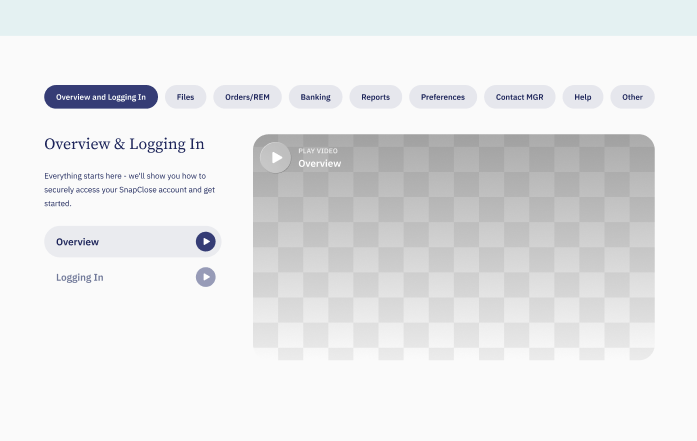
It's a double tab. The first one should be straightforward, but I'm already thinking I'll need ACF if I want to avoid a mess of conditional sections. The problem comes when each section is different.
Something to communicate to the design team: from now on we should pay more attention to consistency, making it easier to implement without having to rely on conditionals.
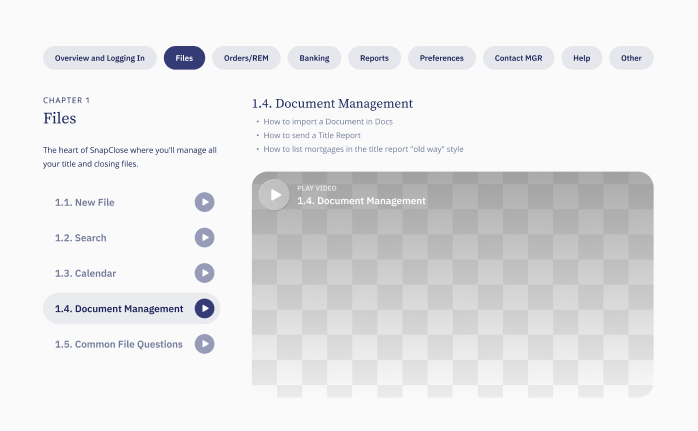
Sometimes, the column containing the video also has a text block above it. The only way to accommodate both situations—with and without the text block—is through a conditional.
Technical Ideas & Requirements
This might be a good time to test Pods, an alternative to ACF Pro. Either way, I still need to implement the design. If Pods works out, the steps would be:
- Implement a static layout
- Install Pods and test it. Check if it has a repeater field option, looks like there's some documentation here
- Create the necessary fields in Pods
- Embed the setup into the static layout
- Create JavaScript logic to make the tabs work
JavaScript Logic
const initTabs = (wrapper, tabSel, panelSel) => {
  const tabs = wrapper.querySelectorAll(tabSel);
  const panels = wrapper.querySelectorAll(panelSel);

  const activate = i => {
    tabs.forEach((tab, index) => tab.classList.toggle("active", index === i));
    panels.forEach((panel, index) => panel.style.display = index === i ? "block" : "none");
  };

  tabs.forEach((tab, i) => tab.onclick = () => activate(i));
  activate(0);
};
If Not Using Pods
- Implement a static layout. Name sections so they can be easily located
- Duplicate the implementation as many times as needed
- Create JavaScript logic
Basically, there are two implementation paths: one that prioritizes scalability and one that prioritizes time. Implementing a static layout is a common step for both, so that's where I can start.
Avada-Specific Approach
In Avada I won't be able to properly implement a repeater field. What I could do instead is display elements through a shortcode generated in PHP that handles the logic. If I go down this implementation path, the right approach would be:
- Use postcards, so I can call the 'tutorial' CPT and ideally apply an entrance animation to the column
- Fill each postcard with a PHP structure that allows calling each video
Tweaking the Setup to My Liking
Someone enabled responsive typography in Avada. I'd like to disable it to set my own font sizing rules.
There's a way to fix this in Avada, and it's forcing the following: --typography_sensitivity: 0;
This makes the font size definition unaffected by the scaling factor that Avada applies.
One way to apply it per page, so it overrides the default values:
<style>
	:root {
	  --typography_sensitivity: 0 !important;
	}
</style>
That above, applied as inline within a style tag would solve it, but if we want to apply it from a stylesheet, more appropriately, it would look like this:
/* where n is the page ID you don't want the auto-scale to be applied */
.page-id-n * {
  --typography_sensitivity: 0 !important;
}
Changelog
- Removed personal notes and kept only technical documentation
- Translated from Spanish to English